


The CONCERT Configuration API is a tool for Pre-Populating User Identities
Adding users to the myriad of software platforms in the modern architecture firm can be a tedious and exhausting process. It can result in errors, frustration, and underutilization. In addition, failing to remove users when they leave the company can be even more time-consuming and potentially have larger consequences if they are not removed promptly. In a project-based management ecosystem, integrating with the single source of truth (SSOT) for authorized users is critical to effective management.
The CONCERT Configuration API provides a simple tool to solve that problem. Firms can use the API to link their ERP or other user management platform to the CONCERT platform. Once connected, changes made to the corporate user management system automatically flow down to CONCERT. The integration sits at the Organizational level in CONCERT, so changes that happen through the API flow through to every project in the platform, automatically.
A Simple Setup
The CONCERT Configuration API is built with a straightforward structure that is friendly to any form of user data. We will work closely with you to set up the most logical data pairing to deliver the most significant impact for your projects and teams. Suppose you can’t build the integration in your user management platform. In that case, CONCERT can provide programming support to help your firm achieve the proper integration as a part of our developer services program. Integration teams at other firms have marveled at how intuitive and straightforward the coding and the language are in the CONCERT Configuration API, compared to other APIs for platforms they use.
Please note, only the Organization Administrators for the CONCERT Platform can initiate the API process.
Setting Up the API
To get started setting up the API for your company, simply go to your organization page in the CONCERT platform. Here you will find a list of all the projects in your organization and the administrative tabs for managing CONCERT in your company. The far right tab is titled “Organization API Keys”. Click on this tab.
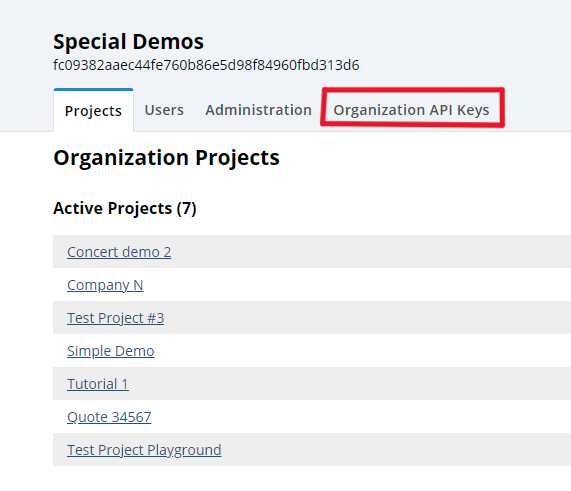
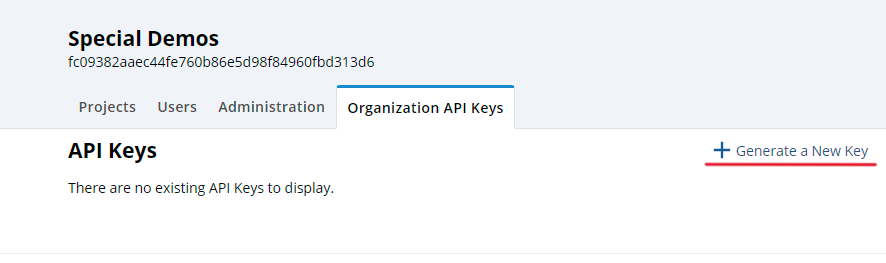
This will take you to the API page, where you can view your active API Keys and create new ones. It is important to remember that APIs require two keys: A Client ID Key and a Secret Key. The Client ID key is unique to your organization and will be displayed on the API page as the identifier for future access. The Secret Key is shown only once – when the API is generated.
WRITE DOWN OR COPY THE SECRET KEY AND STORE IT IN A SAFE PLACE. ONCE IT IS GENERATED, IT WILL NEVER BE SHOWN AGAIN. Both keys are required to access and modify the API in the future, and if you misplace or forget the secret key, it won’t be easy to recreate or recover it.
Generating the API
Generating a new API is straightforward once you reach the API page.
Step 1: On the API page, click on “Generate a New Key”.
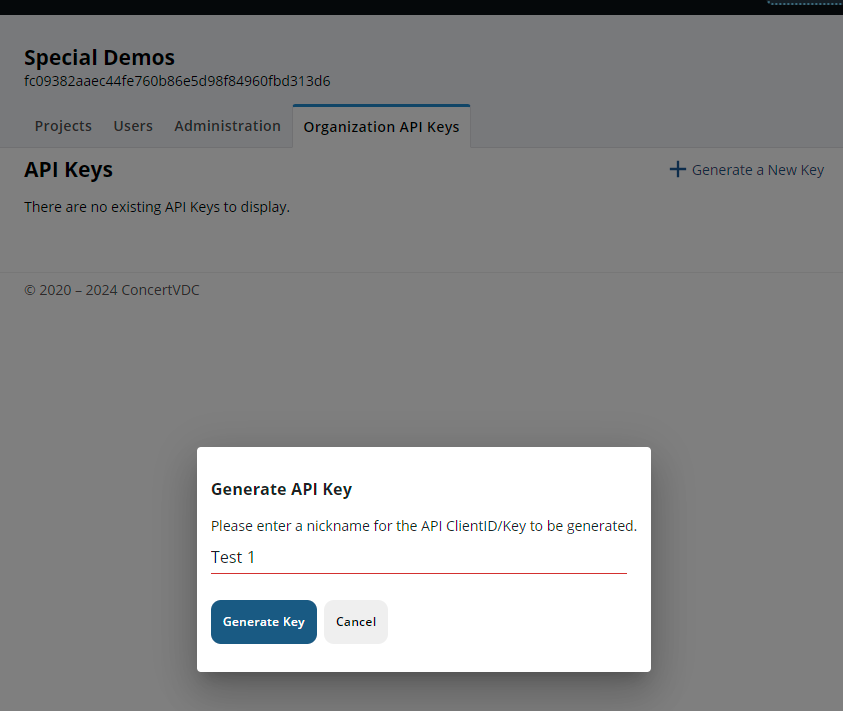
Step 2: Give your API a name.
We suggest naming the API based on the target software it will integrate with. After choosing an appropriate name, click the “Generate API” blue button, and CONCERT will generate an API for your use.
Step 3: Document your Client and Secret Keys.
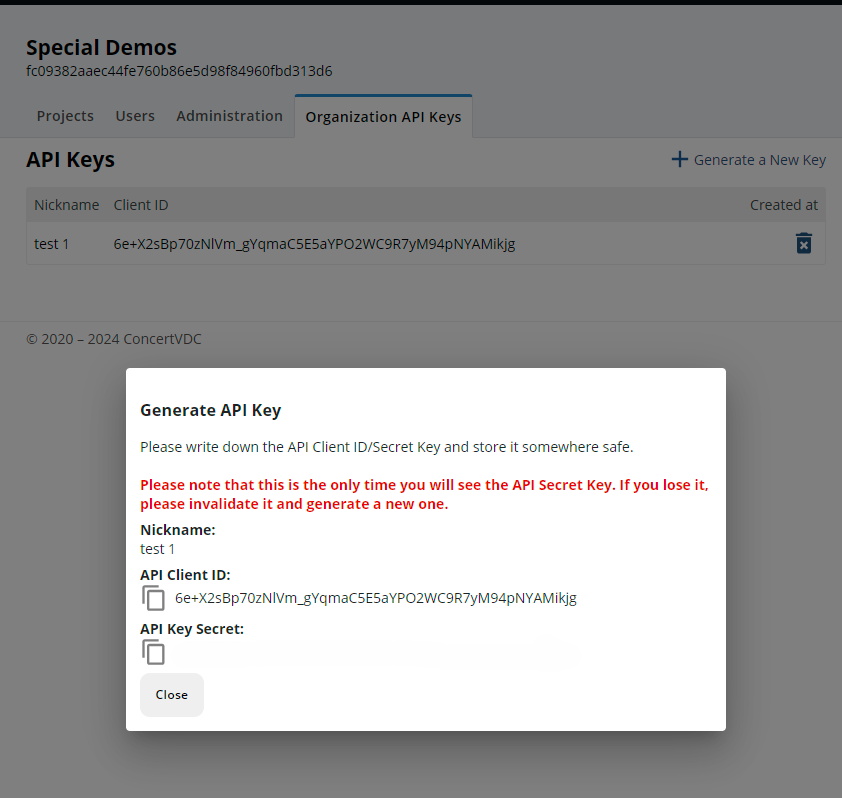
CONCERT has now created an API for your use. The API Client ID will be displayed in your “API Keys” list along with the name you gave the API. The “API Secret Key” will only display when this screen is up. SELECTING THE CLOSE BUTTON WILL PERMANENTLY HIDE THE SECRET KEY FROM ANYONE’S VIEW. This is why it is critical that you write down, copy, take a picture of, or otherwise create a document that you can use when accessing the API in the future. WITHOUT THE SECRET KEY, YOU WILL NOT BE ABLE TO ACCESS THE API. We cannot stress enough how important it is to document your Secret Key before proceeding with the process.
Once you have recorded your secret key for future use, press the “Close” button at the bottom of the pop-up box, and your API is now ready for your use. You will now see all the API’s you’ve generated in CONCERT in your API Keys list. If you are done with an API or you want to replace it, you can delete the API at any time by clicking on the blue trash can on the right side of the API list. Deleting the API will stop the integration; however, any information that was pulled or pushed through the API will remain in the CONCERT platform records.
Create your API today.
CONCERT is focused on reducing the burden of project management by creating integrations and automations that eliminate the administrative drudgery. By using the CONCERT Configuration API to integrate with your other data management platforms, you reduce the risk of errors and duplication and increase the value of your project leaders by giving them better tools to manage.
Call us today for a demo or to help you develop your custom integration using the CONCERT Configuration API